All of us have heard an ElevenLabs voice already, even if we didn’t realize it. We hear it as the calm narrator of a YouTube video, in an audiobook that never sounds tired, or during a customer support call that doesn’t feel like a robot. (You can even try listening to this post by clicking the play button below!)
ElevenLabs is the AI company behind much of that technology. It turns typed text into speech that sounds like a real human, and it can even clone a specific person’s voice from a short recording. If you’re a blogger, podcaster, or small business owner wondering what this tool actually does, how much it costs, and if it’s worth your time, this post is for you.
No tech background is required—learn everything you need to know in plain, simple English.
What’s in This Guide
- What Is ElevenLabs?
- How Does ElevenLabs Actually Work?
- Key Features: What Can You Do With It?
- ElevenLabs Pricing: What You’ll Actually Pay
- The Good and the Not-So-Good
- Is ElevenLabs Safe to Use?
- Who Should Actually Use ElevenLabs?
- Our Verdict
- FAQ
What Is ElevenLabs?
ElevenLabs is an AI audio company that offers a suite of about eight products. However, its flagship product is text-to-speech, which turns written text into spoken audio that sounds natural rather than robotic.
Another standalone feature they offer is voice cloning, which creates AI copies of a real person’s voice. These clones can be trained using just a short audio recording and then utilized for various tasks, ranging from narrating audiobooks to automated customer service calls.
Think of it as a toolbox for anything involving spoken audio: voiceovers, dubbing videos into other languages, and creating AI agents that talk back to you or sound effects for videos. It has grown into a full audio platform, rather than just a text reader.
How Does ElevenLabs Actually Work?
You don’t need to understand machine learning to use ElevenLabs, but knowing the basics helps you get better results (if you want a basic overview, read our post on Natural Language Processing).
Let’s start with its two basic features: text-to-speech and voice-cloning.
You can also try using these while you are reading this post. Just log in to your ElevenLabs account and follow the steps below. If you don’t have an account yet, you can create one by clicking this this link ➔ ElevenLabs.
Text-to-Speech – How to turn text to speech
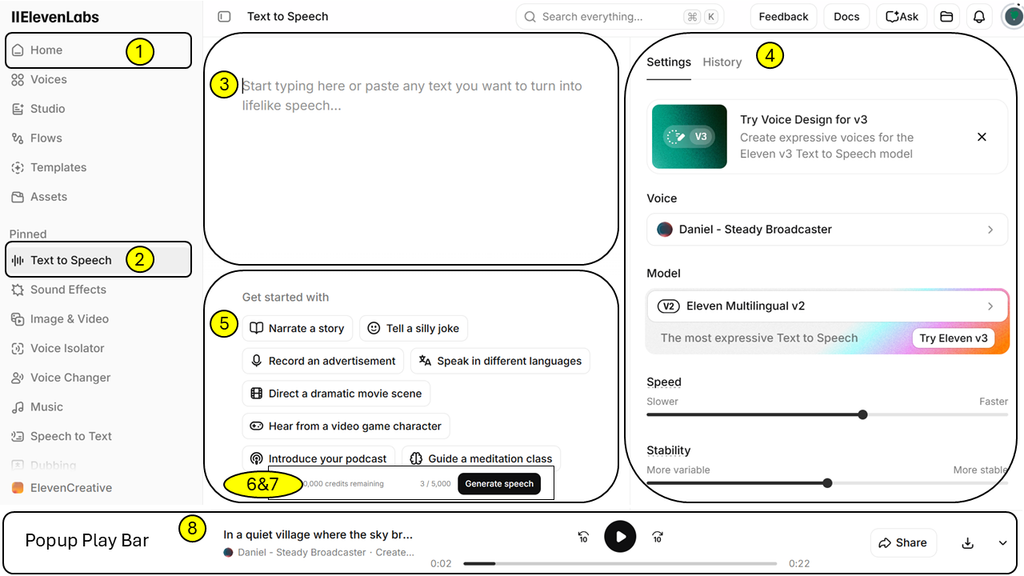
After logging in, follow the steps mentioned below, and check the image to make it easy.
- Click on Home on the top-left sidebar and make sure you are on the same screen as shown in the image.
- Click Text to Speech, and the window shown on the right side of the image will appear.
- In the empty text box, you can type or paste your text.
- The right panel is for your settings, where you can choose the voice type, model, audio speed, and stability.
- The panel in the bottom middle shows some predefined templates for demo use. *****Don’t accidentally click on these, as they will consume your credits.
- So once you have your text ready, just paste it into the text box. The “Generate Speech” button will appear automatically.
- Once you are ready and sure your text is correct, hit Generate Speech.
- And in a few moments, your audio will be ready for listening and downloading.
Voice Cloning – How to Clone my Voice
Voice cloning requires approximately 2 minutes to clone your voice. It happens in a few quick steps:
- On the same Home window, click on “Voices” in the left-hand menu. It will open the Voices dashboard.
- Click on “Create Voice,” the black button in the top-right corner. A new pop-up window will open.
- Select the second option from the top, “Instant Voice Cloning”.
- In the newly opened window, you need to upload your voice. You can either upload a pre-recorded audio file under 10MB, or you can record your voice by hitting the “Record Audio” button. Once done, click Next.
- Once the processing is complete, you will see a new window. Give your voice a name and description, and then save it.
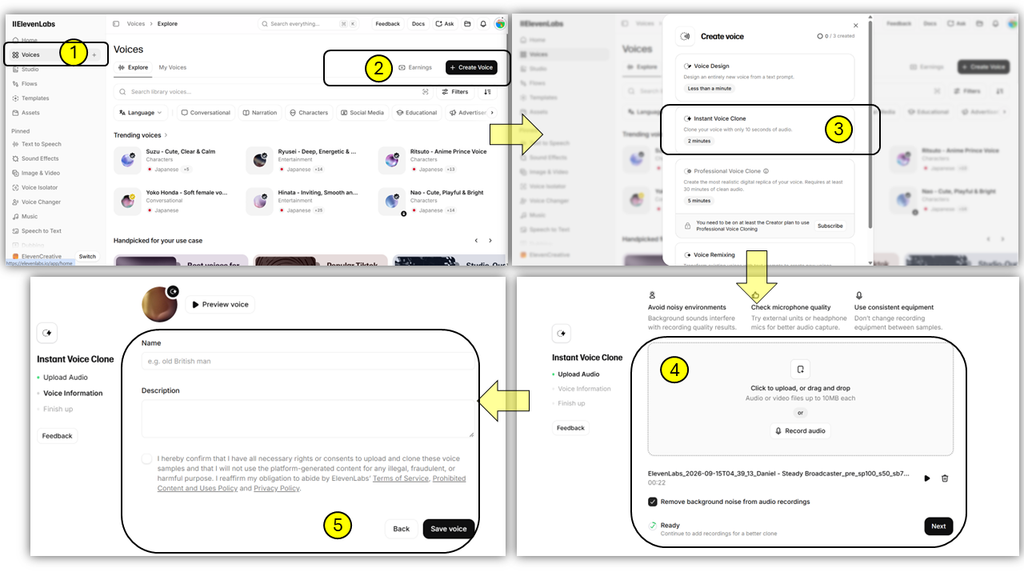
The better the sample audio, the better the cloned voice. Make sure to provide a clean recording in a quiet room.
Key Features: What Can You Actually Do With ElevenLabs?
ElevenLabs packs a lot into one platform. Here’s what you’ll find:
- Text to Speech (as mentioned above) — Type text, choose from a large library of voices, and get natural-sounding audio back.
- Voice Cloning (as mentioned above) — Clone a real voice from a short sample. Instant Cloning is quick and available on entry-level paid plans. Professional Voice Cloning (PVC) uses a longer, studio-quality sample for a noticeably better result, and unlocks starting on the Creator plan.
- Voice Changer — Record yourself, then convert your performance into a different voice while keeping the emotion and timing intact.
- Dubbing — Feed in a video and get back a version dubbed into another language, in a voice close to the original speaker’s own.
- Conversational AI Agents — Build a voice assistant that can hold a real-time conversation, useful for customer support or booking systems.
- Speech to Text — Turn recorded audio into a written transcript.
- Sound Effects & Music — Generate short sound effects or, more recently, full music tracks from a text description.
- Studio — A dedicated workspace for longer projects, like audiobooks or multi-chapter courses.
Most of this is also available through an API, so developers can build ElevenLabs’ voice technology directly into their own apps.
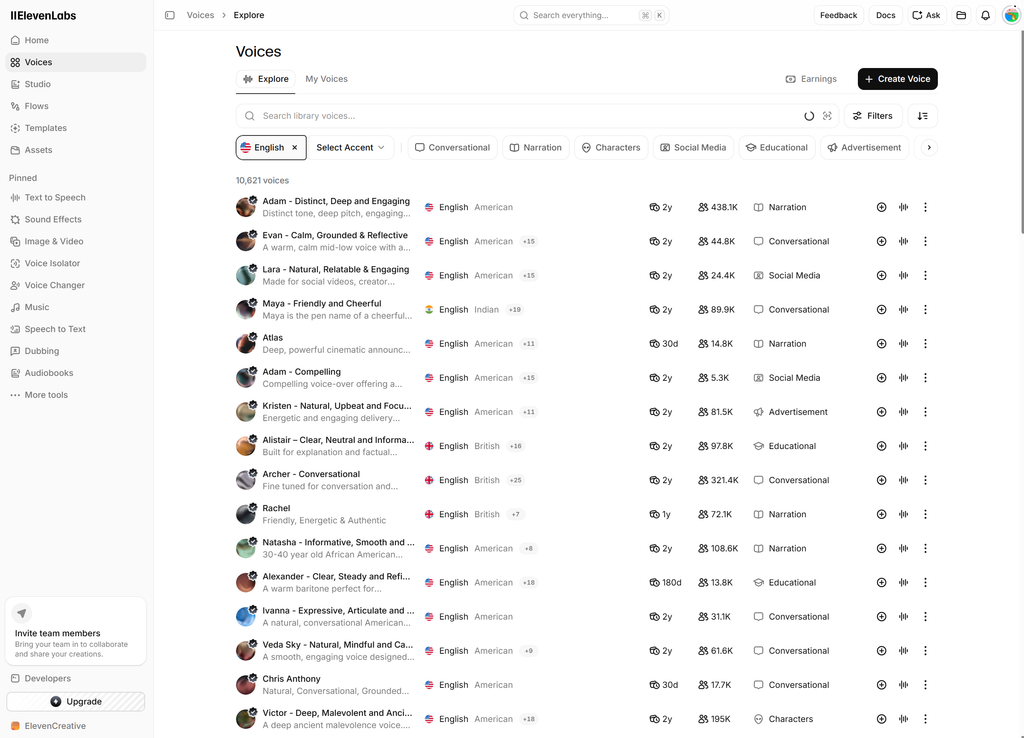
List of Voices you can get at ElevenLabs
ElevenLabs Pricing: What You’ll Actually Pay
ElevenLabs uses a credit system. Every plan gives you a set number of credits each month, and generating audio uses up credits based roughly on how many characters of text you convert.
Monthly Subscription Plans:
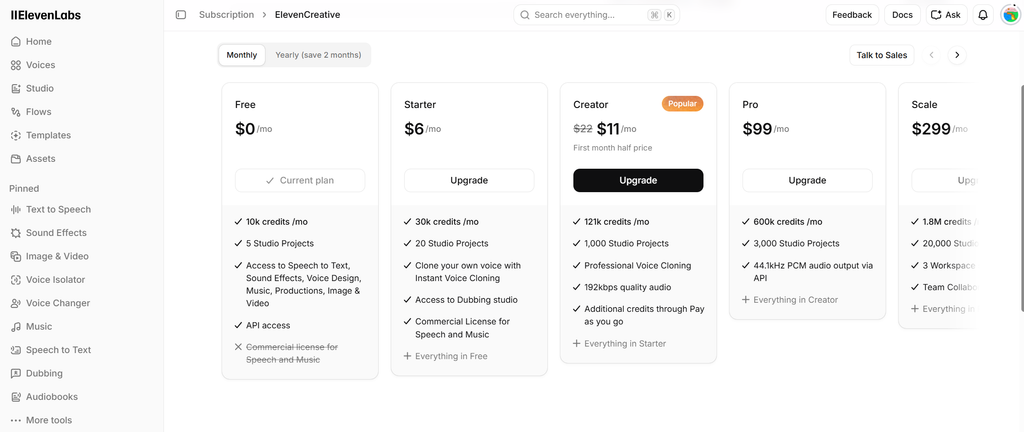
For Latest pricing please check the official page ElevenLabs.
Yearly Subscription Plans:
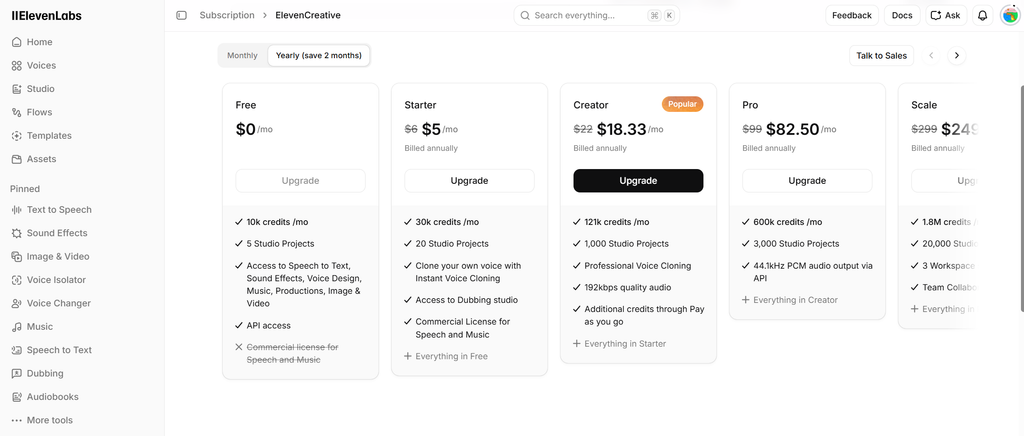
For Latest pricing please check the official page ElevenLabs.
Summary of Subscription Plans:
A few things worth knowing before you pick a plan:
- The Free plan doesn’t include commercial rights — you can test the tool, but you can’t legally use that audio in a monetized video or paid product.
- Professional Voice Cloning, the higher-quality option, only unlocks on the Creator plan or above.
- Unused credits roll over for up to two months on paid plans, so a quiet month isn’t wasted money.
- Paying yearly instead of monthly saves you roughly two months’ worth of cost.
- Going over your monthly credits doesn’t cut you off — ElevenLabs bills the extra usage instead, so keep an eye on it if your budget is tight.
| Plan | Price / Month | What You Get | Best For |
|---|---|---|---|
| Free | $0 | ~10 min of audio, no commercial rights | Testing the voice quality |
| Starter | ~$5–6 | Commercial rights unlocked, Instant Voice Cloning | A low-cost first paid step |
| Creator | $22 (first month sometimes discounted) | ~100 min/month, unlocks Professional Voice Cloning | Podcasters, YouTubers, narrators |
| Pro | $99 | ~500 min/month | Agencies, frequent business use |
| Scale & Business | From ~$299/month, scaling to custom Enterprise pricing | High volume, team seats | Larger teams and enterprises |
(Prices verified against ElevenLabs’s official pricing page in August 2026. AI tool pricing changes often — reconfirm current rates at elevenlabs.io/pricing before publishing, and again before subscribing.)

Pros and Cons
Pros
- The voices sound genuinely natural. Independent reviewers consistently rank ElevenLabs among the most human-sounding AI voices available, with real emotional range instead of a flat, robotic tone.
- It’s more than one tool. Text-to-speech, cloning, dubbing, transcription, and conversational agents all live in one place, so you’re not juggling five different subscriptions.
- The free plan is genuinely useful for testing. You can hear the quality before spending a cent.
- Real safety guardrails exist. ElevenLabs requires a consent check before cloning a voice, which not every competitor bothers with.
Cons
- The credit system takes getting used to. Pricing isn’t a simple flat rate — it’s based on characters generated, and overage charges can add up if you regenerate audio often.
- Quality isn’t equal across all 29-plus supported languages. English and major European languages sound the best; less common languages can feel slightly less natural.
- Good voice cloning needs good source audio. A noisy recording or a short, low-quality clip won’t produce a convincing clone, no matter how good the AI model is.
- It’s cloud-only. There’s no offline mode, so you need a steady internet connection to generate anything.
No AI tool is perfect for every situation, and ElevenLabs is no exception. But the list of genuine strengths is longer than the list of drawbacks, which is a big part of why it’s become the name most creators recognize first in AI voice.
Is ElevenLabs Safe to Use?
Voice cloning is powerful technology, and powerful tools raise real questions. It’s worth addressing this directly instead of glossing over it.
The FTC has publicly warned that scammers use AI voice cloning to impersonate family members or company executives during fraud calls, often asking for money to be wired or sent as gift cards. This isn’t unique to ElevenLabs — it’s a risk across the entire AI voice industry — but it’s a real one worth knowing about.
To its credit, ElevenLabs has built in safeguards. Professional Voice Cloning requires you to read a prompt aloud so the system can verify your voice matches the training sample before a clone is created. The platform also blocks cloning of celebrity and other high-risk voices outright, and every piece of generated audio carries an inaudible watermark that ElevenLabs’ own detection tool can identify, even after editing.
None of this makes misuse impossible — no safety system is airtight — but it does mean ElevenLabs takes the issue more seriously than plenty of competitors. If you ever get a call from someone who sounds like a family member urgently asking for money, hang up and call them back on a number you already know. That single habit defeats almost every voice-cloning scam.
Who Should Actually Use ElevenLabs?
ElevenLabs fits a wide range of people, but it earns its cost fastest for a few specific groups:
- Podcasters and YouTubers who want professional-sounding intros, narration, or multilingual versions of their content without hiring a voice actor.
- Course creators and audiobook narrators who need long-form, natural-sounding narration at a fraction of studio recording costs.
- Small business owners who want multilingual customer support audio, training videos, or a voice for an automated phone system.
- Startup founders and developers building voice-based products, from AI receptionists to in-app assistants, using ElevenLabs’ API.
There’s also a smaller but meaningful use case worth mentioning: some people use voice cloning to preserve their voice for loved ones, or for accessibility reasons if they expect to lose the ability to speak. It’s a reminder that behind the pricing tiers, this is genuinely useful technology.
If your work rarely involves audio at all, the free trial is still worth ten minutes of your time — but you probably won’t need to pay for it.
Is ElevenLabs Worth It?
Our Rating: 4.3 / 5
ElevenLabs earns its reputation. The voice quality is about as good as this space currently gets, the feature set covers far more than basic text-to-speech, and the safety measures around voice cloning are more thoughtful than most competitors offer.
The trade-off is a pricing structure that takes a little study to understand, and a free plan too limited for anything beyond testing. For anyone who regularly needs voiceovers, narration, or multilingual audio, though, the Creator plan at $22 a month is a reasonable cost for what you get back.
Ready to hear it for yourself? ElevenLabs — the free plan takes about five minutes to try.
Conclusion
ElevenLabs has grown from a text-to-speech tool into a full audio platform — voice cloning, dubbing, conversational agents, and more, all in one place. The voice quality is genuinely impressive, the pricing takes a bit of learning, and the safety features around cloning are better than most.
If you create podcasts, videos, or courses, or need multilingual audio for your business, it’s worth the ten minutes it takes to test the free plan. If audio isn’t a regular part of your work, you can safely skip it for now.

FAQ’s
Is ElevenLabs free to use?
Yes. The free plan includes about 10 minutes of generated audio a month. It’s useful for testing the voice quality, but it doesn’t include commercial rights, so you can’t use that audio in monetized content or paid products.
Can I clone my own voice with ElevenLabs?
Yes. You can clone your own voice using Instant Voice Cloning on paid plans, or Professional Voice Cloning on the Creator plan and above for a higher-quality result. You can only clone a voice you own or have clear permission to use.
Is ElevenLabs safe, or can anyone clone my voice without my permission?
ElevenLabs requires a verification step before creating a professional voice clone, and it blocks cloning of celebrity and other high-risk voices. That said, AI voice cloning as a technology carries real fraud risks industry-wide, so it’s worth staying alert to unexpected calls asking for money, no matter which tool might be behind them.
What languages does ElevenLabs support?
ElevenLabs supports more than 29 languages. English and major European languages sound the most natural, while some less common languages can sound slightly less polished.
Do I need any technical skills to use ElevenLabs?
No. The basic text-to-speech tool is as simple as typing text and picking a voice. Some advanced features, like building a conversational AI agent, are easier if you’re comfortable with basic tech setup, but they’re not required for most everyday uses.
How is ElevenLabs different from a normal text-to-speech tool?
Most basic text-to-speech tools sound noticeably robotic and offer one or two generic voices. ElevenLabs focuses specifically on natural-sounding speech, offers voice cloning, and adds features like dubbing and conversational agents that go well beyond reading text aloud.